4.4. Selection and Construction of Components
From the suggestions made for an improvement of the health information system, two were selected for realization in the remaining weeks. The training of staff, which actually was picked up already, was to be continued, and the development of a software application product had to be started. This corresponds to the suggestions five and seven in annex R "Report: 'The Kabarole District Health System - Description, Opportunities and Suggestions for Improvement'".
4.4.1. General Training of Staff
From the consultations on problems with the computers, the need was felt for a more fundamental training of the data entry clerks. Therefore a computer class was offered, which covered the basic technical backgrounds of a computer, an introduction into the "MS-DOS" file system and an introduction into the statistical software package "EpiInfo".
Especially the introduction into the "MS-DOS" file system was felt to be important to enable the data entry clerks to produce security copies of their work. A series of 15 self explaining text files was produced of which each introduced a "MS-DOS" command and offered a little exercise, which could be done on the computer directly after reading the text file on the same computer. After introducing basic principles of "MS-DOS", the exercises enabled the author of this study to let the students practice the commands according to their own pace, while concentrating on individual problems. The introduction of "EpiInfo" was done after a general introduction by using some of the "EpiInfo" tutorials.
4.4.2. Selection of the Software Development System
The selection of components for the software development system had to be carried out in Germany already. The decision was made for a Toshiba notebook from the T1910 series with an Intel 80486 processor, eight megabytes RAM and a 200 megabytes harddisk. Two rechargeable battery packs guaranteed a continuous work for about one working day even in case of power failures. As an overpower protection an external fuse was obtained and a spare power adapter for emergencies was taken along. As programming language the decision was in favor of "Clipper". "Clipper" is a very popular, "DBase" compatible compiler language. For the integration of graphics, the "dGE" graphics library was supplemented.
4.4.3. Construction of the Software Application Product
The need for the construction of a software application product, which was foreseen in the objectives of this thesis, was confirmed by the systems analysis. While the objectives of this thesis gave general principles for the design, the systems analysis provided more detailed information on the needed features of the software application product. As a first step for the construction of the software application product, results from the systems analysis were extracted, which had to be considered for the construction. On the one hand it was analyzed from these result, which data were to be managed by a database. On the other hand, they provided the information on what kind of data processing functions had to be implemented.
Opportunity 6 from chapter 2. "Opportunities for Improvement" of annex R "Report: 'The Kabarole District Health System - Description, Opportunities and Suggestions for Improvement'" specified the need for a simplification of computer based data processing at the district level. This problem became very pressing during the time of deployment. The mandatory compilation of the monthly summary report for a reporting to the national level with the central form MF77 (compare 1.6.2. "Conventional Tools" of annex R) had to be carried out manually. There had been a computer based procedure for doing the compilations before. However, since the statistician left, nobody knew how to carry out the complicated procedure completely. The manual way worked, but put an immense workload on the data entry clerks. Therefore a solution had to be found quickly.
The data from MF77 are not the only forms, which require a compilation at the district level. There is not much difference between typing the data into a calculator and typing them into the computer. When these data must be entered into the computer anyway, they could be used for other purposes as well, which exceed the required reporting. This was taken as the starting point for the following synopsis of results from the systems analysis, which had to be considered for the construction of the software application product:
- Each health unit turns in reports, which have to be summarized at the district level. Occasionally a new health unit is constructed, or an old health unit is shut down. The spelling of the health unit names varies even in official documents.
- There exists a variety of forms for the reports. The mandatory reporting frequency over one year varies from one form to the other. Once in a while new versions of a form come up, which have modified data demands.
- While the compilation of summary reports is currently the only form of presentation, the need for additional means of presentation is evident. For the use at district level and for backward reporting to the health units it is necessary to enable a comparative presentation of data from sets of health units, either graphically or tabulated. Presented data should not only be plain numbers, but also related to target populations.
- The health unit data might have to be stratified for presentation according to various criteria. This can be according to the supervisory area, in which the health unit is, or to different endemic areas of a certain disease like malaria. These criteria are subjected to change and are not foreseeable.
- Since all the above mentioned factors can change, they can not be encoded into the software application product, but have to be adjustable by local staff.
With the above listed demands for the software application product, in a next step the object types for the conceptual database scheme design were abstracted (compare section 2.4. "An Object Oriented Method for Database Scheme Design"). The following object types were abstracted right away, while others had to be added in the further progress of the data base scheme design:
- Health units are the central objects. They were abstracted into the object type "Unit".
- The reports from each unit for each form are the next objects of concern. Usually the reports for one form are abstracted into one object type per form. This has the big disadvantage, that data processing functions, which have to be implemented later on, have to be programmed according to the respective forms. Therefore they can not be adjusted by local staff in case of a new version of a form. To avoid this, the information about the structure of a form was abstracted into a separate object type "Form". Along with this, another object type "Report" had to be abstracted for the actual contents of a form.
- With regard to a stratification of health units the object type "Category" was introduced as an abstraction of criteria for stratification. The object type "Group" is an abstraction of the different strata for one criterion.
- On first sight, services could be represented as objects of the object type "Group", with the criterion "Service" being an object of the object type "Category". Considerations about target populations, which are discussed later in this section, demanded an extra abstraction of the object type "Service", though.
While these are the most obvious object types, some more had to be added. However, a description of these can be understood better in the next step of data base scheme design. With the modelling of characterizing relations, the need for the additional object types is more obvious.
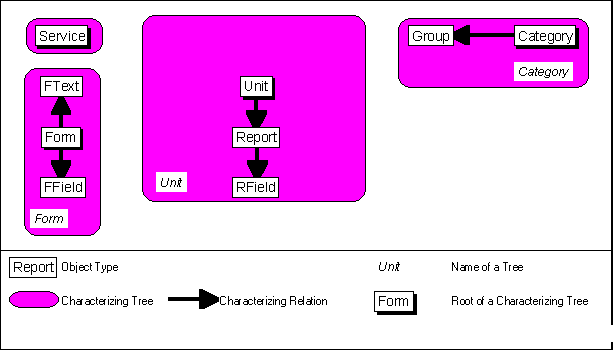
"Unit" is characterized by "Report", since one health unit produces several reports, but the reports can not exist without that unit. When a health unit is removed, all the reports from that unit have to be removed. Each report contains several data on several variables. The data as objects had to be abstracted into an extra object type, "RField". It is not possible to define data as properties of "Report", since each report contains data according to the form, for which it was done. The information of the types of data which can be in a report, is represented by the object type "FField". "FField" characterizes "Form", which means that a form contains several fields, in which data can be entered. Also, a form contains textual information. This was abstracted into the object type "FText", which also characterizes "Form". Finally a characterizing relation exists from "Category" to "Group". Figure 4.4-1 depicts the resulting characterizing trees:
Fig. 4.4-1: The object types, which were abstracted from the results of the systems analysis, were related with characterizing relations.
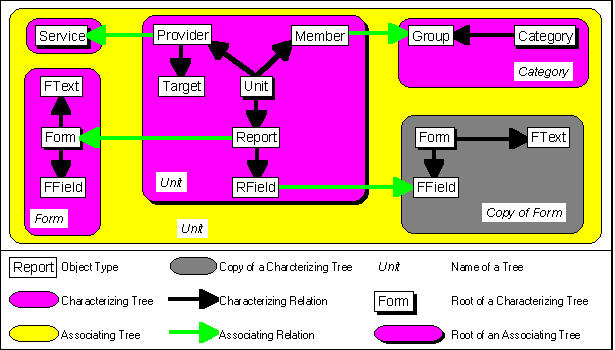
After the characterizing trees were identified, the associating relations could be modelled. The modelling of associating relations again demanded the addition of object types. In order to connect health units to a group, the object type "Member" had to be supplemented. One health unit can belong to many groups, but also one group can contain many health units. Therefore "Unit" and "Group" are in a (M:N) relation which is not allowed. "Member" splits up this relation, by characterizing "Unit" and associating "Group". In the same way, "Provider" associates "Service" and characterizes "Unit". Here the need for the extra definition of "Services" becomes obvious. Since the target population of a health unit is different for all provided services, the information about services is too complex to be represented simply by "Category". Therefore the object type "Target" had to be introduced, to represent the target population for each provided service for each year. "Target" characterizes "Provider".
By looking at the associating relations, the somewhat complex structure of the reports becomes clearer, also. There are two associating relations into the characterizing tree Form, both from the characterizing tree Unit. "Report" associates "Form", while "RField" associates "FField". It was therefore necessary to create an additional characterizing tree Copy of Form. With these relations it is possible to get the information, into which fields data have to be entered for a report via "Report"-"Form"-"FField". On the other hand it is possible to find out, to which field in which form entered data belong. Figure 4.4-2. depicts the identified associating relations:
Fig. 4.4-2: The associating relations merge the characterizing trees to one associating tree.
After the associating relations were modelled, properties were assigned to the object types. A presentation of the complete list of properties is definitely not appropriate in this context. The properties were deducted into attributes of the logical database scheme after the completion of the conceptual database scheme, and from there realized into elements of the physical database scheme. An exemplary presentation of the most interesting resulting database files is listed in tables 4.4-1 to 4.4-5. They resulted from the object types "Report", "RField", "Form", "FText" and "FField", which form the heart of the data entry system. Note, that the "#" key is not allowed for field names in Clipper. Therefore the surrogate keys were marked by an underscore ("_") at the end of the name.
The database file "FORM.DBF" was realized from the object type "Form". It contains general information on each form, especially its name and its reporting frequency over the year:
Tab. 4.4-1: Fields of the "FORM.DBF" database file realize properties of the "Form" object type.
| Field | Type | Size | Comment |
| FORM_ | Numeric | 10 | Surrogate key for an identification of each form. |
| LONGNAME | Character | 35 | Long, explaining name of the form. |
| SHORTNAME | Character | 8 | Short name of the form as it comes from an EpiInfo generated record file. |
| FREQUENCY | Numeric | 2 | Reporting frequency of the report for one year. |
The database file "FFIELD.DBF" was realized from the object type "FField", which characterizes the object type "Form". It contains therefore the information on the single data entry fields, which are part of a specific form:
Tab. 4.4-2: Fields of the "FFIELD.DBF" database file realize properties of the "FField" object type.
| Field | Type | Size | Comment |
| FFIELD_ | Numeric | 10 | Surrogate key for an identification of each data entry field. |
| FORM_ | Numeric | 10 | Reference to the form to which the data entry field belongs. |
| NAME | Character | 10 | Name of the data entry field. |
| COL | Numeric | 3 | Vertical position of the data entry field within the form in character units. |
| ROW | Numeric | 3 | Horizontal position of the data entry field within the form in character units. |
| LENGTH | Numeric | 10 | Length of the data entry field in character units. |
| ORDER | Numeric | 4 | Position of the data entry field in the array of all data entry fields which belong to the same form. |
Just like the data entry fields, text elements are also part of a form. The database file "FTEXT.DBF" is a realization of the object type "FText" which also characterizes "Form". It contains the information on the single text elements:
Tab. 4.4-3: Fields of the "FTEXT.DBF" database file realize properties of the "FText" object type.
| Field | Type | Size | Comment |
| FTEXT_ | Numeric | 10 | Surrogate key for an identification of each text element. |
| FORM_ | Numeric | 10 | Reference to the form to which the text element belongs. |
| TEXT | Character | 80 | Contents of the text element. |
| COL | Numeric | 3 | Vertical position of the text element within the form in character units. |
| ROW | Numeric | 3 | Horizontal position of the text element within the form in character units. |
In the previous three databases the information about the forms are kept, for which data are being entered. The next two data bases contain the actual information on data, which were entered. The data base "REPORT.DBF" was realized from the object type "Report". It contains general information on a report:
Tab. 4.4-4: Fields of the "REPORT.DBF" database file realize properties of the "Report" object type.
| Field | Type | Size | Comment |
| REPORT_ | Numeric | 10 | Surrogate key for an identification of each report. |
| UNIT_ | Numeric | 10 | Reference to the health unit for which the report was entered. |
| FORM_ | Numeric | 10 | Reference to the form for which the report was entered. |
| NUMBER | Numeric | 2 | Number of the report within one year. |
| YEAR | Numeric | 4 | Year of the report. |
The data base "RFnnyyyy.DBF" is a realization of the "RFields" object type, which characterizes the "Report" object type. It consists of several data base files, which contain all the entered data of one reporting period. The identification of the reporting period, for which the files contain data, is done by setting "nn" and "yyyy" to the respective number and year.
Tab. 4.4-5: Fields of the "RFnnyyyy.DBF" database files realize properties of the "RField" object type. "nn" and "yyyy" change according to the reporting number and year, to which the respective records belong.
| Field | Type | Size | Comment |
| REPORT_ | Numeric | 10 | Reference to the report to which the value belongs. |
| FFIELD_ | Numeric | 10 | Reference to the data entry field, for which the value was entered. |
| VALUE | Numeric | 10 | Actual value. |
Originally the "RField" object type was realized by only one data base file "RFIELD.DBF". After entering data for two months, the first implementation of the software application product turned out to be unacceptably slow when retrieving entered data. The amount of created records in the "RFIELD.DBF" data base file was too big for a good performance. Eventually it would have been impossible to make security copies of the data base file, since its size would have exceeded the capacity of conventional floppy disks. It had to be broken down into smaller units, the "RFnnyyyy.DBF" files. It has to be seen, though, that this method offends requirements of the relational data base scheme theory. The information on the reporting period appears in the "REPORT.DBF" data base file, as well as in the name of the "RFnnyyyy.DBF" data base files. They are therefore a source for inconsistencies, which has to be controlled by the application software product.
The elaboration of the data base scheme in the previous section only covers the data which come up in the district. Additional data base files for the management of data that occur during execution of the software application product had to be added as well. These do not contain complex relations, though. Therefore they could be created without a specific data base scheme design. These files contain information on graphical menus and setup information. Also it was decided to keep textual information, which is specific for the Kabarole district in a data base file, rather than coding it into the software application product. Since the information on health units, forms and services is already adjustable, this step guarantees an universal usability of the software application product in other districts with similar requirements.
The requirements for the actual functions of the software application product were given by the results from the systems analysis, by the objectives of this thesis and by special needs for adapting the application software product to the settings in the district. Limitations were given by the remaining available time and by the capability of the "Clipper" programming language and the "dGE" graphics library. As a result, the software application product "Kabarole!" was created. Besides being the name of the district, the word kabarole has the meaning "Let them see!" in rutooro, which is the main local language in Kabarole district. A detailed description of the functions of "Kabarole!" is given in annex M "Users Manual of 'Kabarole!'". The following considerations and actions came up during the implementation of functions into "Kabarole!":
- As a general guideline for all functions, which require an interaction with the user, objective (v) demands lucid user promptings. The use of user promptings which can be operated by using the computer mouse is definitely the most elegant way. The functions of the "dGE" graphics library supported the use of a mouse in the graphics mode of the computer. However, the graphics mode turned out to be too slow when rapidly changing text was to be displayed. Screen setups in the character mode had to be used as well.
- First priority had to be given to the implementation of functions which enable the setup and adaption of "Kabarole!" to the needs of the district. Functions for implementing health units, forms, services and categories into "Kabarole!" had to be provided. As central part for maintaining the information on health units, a district map was implemented on which health units can be created and modified by using the mouse (compare section 5.1.2. "The District Map for Setting Up Health Units" from annex M). This map was later on also implemented into functions which require the selection of a health unit either for data entry, or for data export. For the implementation of data entry forms, a function for converting "EpiInfo" record files was created. The design of the data entry forms can be done with the "EpiInfo" record file generator, which is simple to use. Afterwards, the record files, which were created this way, can then be imported into "Kabarole!" (compare section 5.1.7. "Form Definitions" from annex M).
- After the functions for setting up and maintaining district data had been implemented, a function for entering reports followed. Again, the district map was integrated for the selection of the health unit, for which a report is to be entered. This way the selection of a health unit is done according to its geographical position, and not according to its name, for which the spelling might not be clearly defined. For the actual data entry, a function had to be programmed which displays the text elements and the data entry fields from the form definitions. The "Clipper" functions alone were not sufficient, since they did not allow to scroll the data entry form on the screen. The data entry function is described in chapter 3. "Data Entry Guide" of annex M.
- Data presentation functions had to be implemented next. As mentioned before, the need for calculating summary reports was most pressing. Therefore the provision of a function for summarizing report data was the most urgent task. The summary function was designed very openly. The reporting periods can be specified freely, allowing summaries over one or more reporting periods. Also, summaries can be done for all health units, for a single health unit or for a selection of health units by specifying groups or services. The summary function is described in sections 4.1.2. "Settings for Calculating a Summary Report" to 4.1.4. "The Calculated Summary Report" of annex M.
- Since the scheduled time for the deployment was almost over after the summary functions were completed, functions for more sophisticated data evaluation could not be implemented. However, an export function was designed, which creates a "DBase" compatible data base file for further data evaluation and presentation with other software application products. Similar to the summary function, the export function allows a definition of reporting periods and health units to be included into the export file. The export function is described in sections 4.1.5. "Settings for Creating a 'DBaseIII' Compatible Export File" to 4.1.7. "The Export File" of annex M. Exemplary suggestions for using "EpiInfo" for further processing of the export file can be found in section 4.3. "Advanced Presentation Techniques using 'EpiInfo'" of annex M.
The resulting software application product was compiled into a single standing program. Therefore it does not rely on the availability of other software application products for execution. Preliminary versions were installed on the computer in the statistics office, to introduce the software application product step by step to the data entry clerks and to allow pretesting.
Objective (v) of this thesis also demands the provision of a users manual. Since the available time during the deployment was very limited, the design of the manual had to be done in the third phase of the systems engineering project in Germany. It can be found in annex M "Users Manual of 'Kabarole!'". The manual had to be comprehensive, while at the same time giving access for unskilled staff, also. It was therefore designed for three different groups of users according to the degree of skills. Each topic is described for all three groups. It is followed by a description of specific tasks, which are marked according to the required degree of skills. The manual has a flexible binding to allow updates of the manual along with updates of the software application product by simply updating relevant chapters.